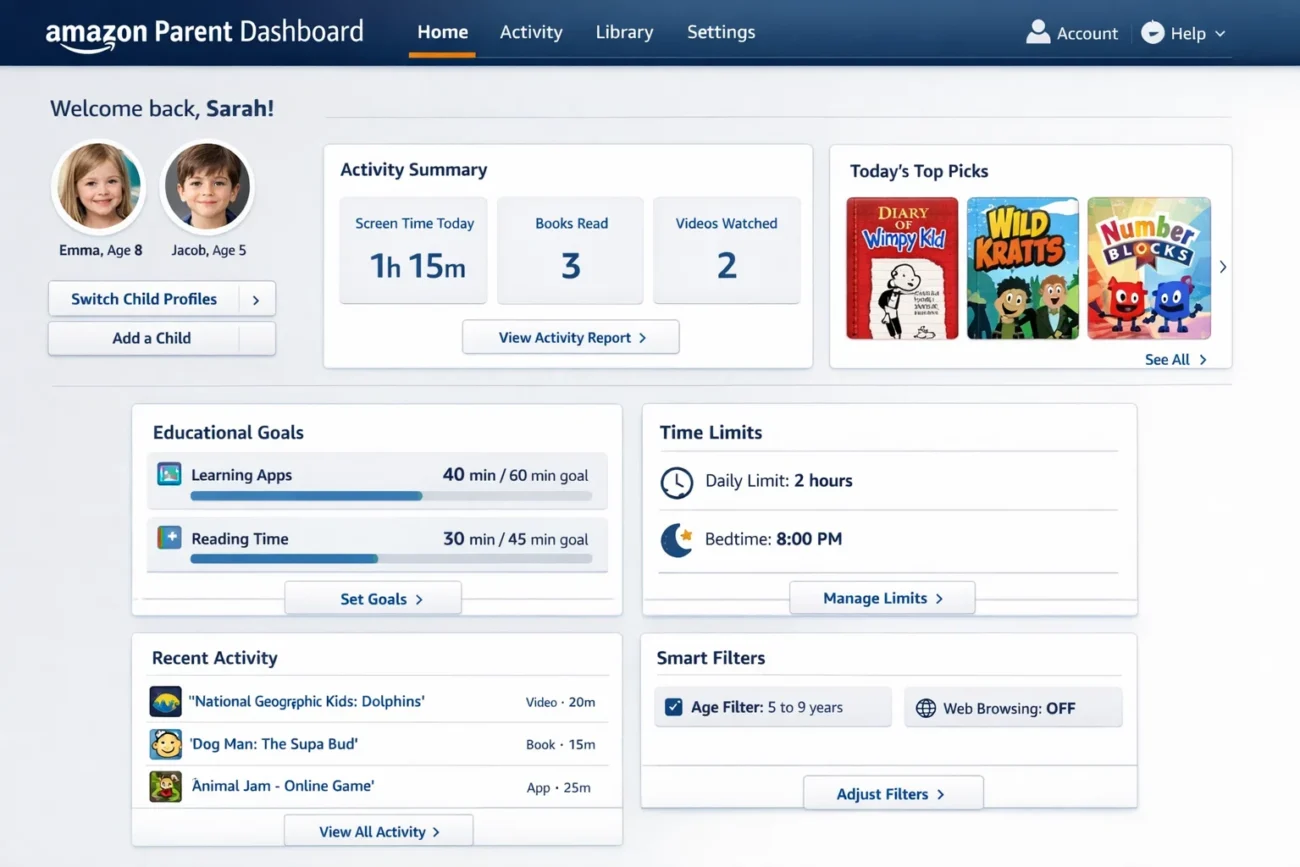
Understanding the Amazon Parent Dashboard
The Amazon Parent Dashboard is an innovative tool designed by Amazon to help parents manage, monitor, and control their children’s use of Amazon devices and services. With the surge in digital content consumption among younger audiences, Amazon recognized the need for a centralized hub where parents could oversee what their children access.
The dashboard provides a seamless experience, allowing parents to track purchases, set digital boundaries, and ensure safe browsing and entertainment for their family members. Unlike generic parental control apps, the Amazon Parent Dashboard integrates directly with Amazon’s ecosystem, including Kindle, Fire tablets, Echo devices, and Amazon Prime content, offering a holistic approach to digital parenting.
Key Features of the Amazon Parent Dashboard
The Amazon Parent Dashboard comes packed with features tailored to give parents peace of mind. First, it allows the creation of individual profiles for each child, ensuring personalized content restrictions based on age and maturity. Second, the dashboard includes real-time activity tracking, showing which apps, games, and videos are being used most frequently.
Parents can also manage purchase approvals, preventing unintended spending through Amazon’s digital store. Another standout feature is screen time management, enabling parents to set daily or weekly limits and schedule device downtime. Additionally, content filtering ensures children access only age-appropriate material, from books and apps to movies and music.
Setting Up Your Amazon Parent Dashboard
Setting up the Amazon Parent Dashboard is straightforward but requires careful attention to detail. First, you need an Amazon account that acts as the family manager. After signing in, navigate to the “Amazon Parent Dashboard” section within your account settings. Here, you can add family members, create child profiles, and link Amazon devices.
It is crucial to enter accurate age details for each child, as content restrictions are automatically tailored based on this information. Once profiles are set, parents can explore settings such as purchase approvals, content restrictions, and screen time controls. The setup process also allows notifications to be configured, keeping parents informed about activities, purchases, and access attempts outside the approved boundaries.
Managing Content and Age Restrictions
One of the main advantages of the Amazon Parent Dashboard is its ability to manage content effectively. The dashboard categorizes content by age groups, ensuring that children access only suitable books, videos, and apps. For instance, Kindle books can be filtered so that only titles with appropriate ratings appear in a child’s library. Similarly, Fire tablets and Echo devices can restrict access to certain apps or Alexa skills based on maturity level.
Parents also have the flexibility to approve or block specific content manually, giving them ultimate control over what their children consume. This feature is particularly valuable for parents who want to introduce certain media gradually while avoiding content that may be too mature or potentially harmful.
Monitoring Usage and Activity
The Amazon Parent Dashboard excels in activity monitoring, providing parents with detailed reports of their children’s device usage. Activity logs display which apps were accessed, how long each app was used, and the types of content consumed. This information helps parents understand their child’s interests, digital habits, and potential exposure to inappropriate material.
The dashboard highlights trends, such as peak usage hours, enabling parents to make informed decisions about screen time limits. Real-time alerts also notify parents if a child attempts to bypass restrictions, such as attempting to make a purchase without approval or accessing blocked content. This proactive monitoring ensures a safer digital environment.
Screen Time and Device Management
Managing screen time is one of the most critical aspects of responsible digital parenting, and the Amazon Parent Dashboard makes it effortless. Parents can set daily or weekly limits for each child, specifying which apps or devices are restricted during certain hours. For example, bedtime schedules can be enforced automatically, preventing children from using devices late at night.
In addition to daily limits, the dashboard offers “curfew” settings that block access to the internet or specific apps for extended periods. This comprehensive control ensures that children maintain a healthy balance between digital entertainment, study time, and physical activities. With these features, parents can encourage responsible device use without constant supervision.
Managing Purchases and Subscriptions
A significant concern for parents in the digital age is unauthorized purchases. The Amazon Parent Dashboard addresses this by providing detailed control over spending. Parents can require purchase approvals for all digital content, including apps, games, and e-books. Any attempt to make a purchase triggers a notification, allowing parents to approve or deny the transaction.
Subscription management is also simplified through the dashboard, ensuring children do not subscribe to services without parental consent. This feature not only prevents unexpected charges but also teaches children about responsible spending and financial awareness in a controlled environment.
Integration with Amazon Devices
The Amazon Parent Dashboard is uniquely powerful because it integrates with multiple Amazon devices. Fire tablets, Echo devices, Kindle e-readers, and Fire TV all work seamlessly with the dashboard, enabling centralized management. For example, Alexa-enabled devices can be restricted from answering certain questions or playing explicit content, while Fire TV usage can be limited to age-appropriate shows and movies.
This integration ensures that no matter which Amazon device a child uses, the same parental controls and restrictions apply. Parents can manage all devices from a single dashboard, eliminating the need to configure settings individually on each device, which saves time and reduces the risk of oversight.
Benefits of Using Amazon Parent Dashboard
The benefits of using the Amazon Parent Dashboard extend beyond mere monitoring. It empowers parents to create a structured digital environment tailored to their child’s developmental needs. By managing content, usage, and purchases, parents can prevent overexposure to inappropriate material while encouraging educational and constructive digital experiences.
It fosters communication between parents and children about healthy screen habits and online safety. Another benefit is peace of mind; knowing that parental controls are active and enforceable allows parents to feel confident that their children can safely explore the digital world without constant supervision.
Common Challenges and How to Overcome Them
While the Amazon Parent Dashboard offers a comprehensive solution, some challenges may arise. For example, older children may attempt to bypass restrictions or find ways to access content outside the dashboard. To address this, parents should regularly review activity logs and maintain open communication with their children about digital boundaries.
Another challenge is keeping the dashboard updated with the latest features, as Amazon frequently introduces new tools and settings. Regularly checking for updates and exploring newly added options ensures that parental controls remain effective and relevant. Finally, balancing strict control with reasonable freedom is essential; overly restrictive settings may cause frustration and hinder learning opportunities.
Tips for Maximizing the Dashboard’s Effectiveness
To get the most out of the Amazon Parent Dashboard, parents should consider several best practices. First, set realistic screen time limits based on age, school schedules, and extracurricular activities. Second, regularly review activity reports to identify patterns and adjust restrictions accordingly. Third, engage children in discussions about safe and responsible content consumption, making them active participants in their digital education.
Fourth, customize content filters for each child individually, as different children may have unique interests and maturity levels. Finally, use the purchase approval system not just as a restriction but as a teaching tool to instill financial responsibility.
Future of Digital Parenting with Amazon Parent Dashboard
The Amazon Parent Dashboard represents a significant step forward in digital parenting, and its future looks promising. As Amazon continues to expand its ecosystem, the dashboard is expected to evolve with more advanced AI-driven features, such as predictive content recommendations, adaptive screen time suggestions, and enhanced real-time monitoring.
Integration with educational platforms may also become more seamless, allowing parents to guide their children’s learning experiences alongside entertainment. Additionally, data analytics and reporting may provide deeper insights into digital behavior, helping parents make informed decisions while promoting balanced and healthy device usage.
Comparison with Other Parental Control Tools
Compared to third-party parental control apps, the Amazon Parent Dashboard offers unique advantages due to its native integration with Amazon devices and services. While many control apps require separate installations and subscriptions, Amazon’s solution is built into the ecosystem, making setup and management more straightforward.
It also provides a comprehensive suite of features in a single dashboard, from screen time management to purchase approvals and content filtering. Other tools may excel in niche areas, such as web filtering or social media monitoring, but the Amazon Parent Dashboard’s strength lies in its holistic approach, combining convenience, security, and versatility across multiple devices.
User Experiences and Reviews
Parents who have adopted the Amazon Parent Dashboard report high satisfaction, citing ease of use and the peace of mind it offers. Many highlight the ability to monitor multiple devices from one central location as a major advantage, especially in households with several children. The purchase approval system is also widely appreciated for preventing unexpected charges and teaching children about responsibility.
Some users have noted initial learning curves when navigating settings, but Amazon’s tutorials and help resources make adaptation quick and intuitive. Overall, user feedback emphasizes that the dashboard not only safeguards children but also supports a more structured and educational approach to digital device use.
Conclusion
In today’s digital age, children are exposed to a vast array of content and devices, making parental oversight more important than ever. The Amazon Parent Dashboard offers a robust, integrated solution for managing, monitoring, and guiding children’s digital experiences. By providing tools for content filtering, screen time management, purchase approvals, and real-time activity monitoring, it ensures that children enjoy a safe and age-appropriate online environment.
Its seamless integration with Amazon’s ecosystem makes it practical and easy to use. For parents seeking peace of mind, responsible digital guidance, and a structured approach to their children’s device usage, the Amazon Parent Dashboard is an invaluable resource that balances freedom and security effectively.
You May Also Read: Washington Wizards vs Detroit Pistons match player stats
